Your tracking pixel is switched on. It is not firing.
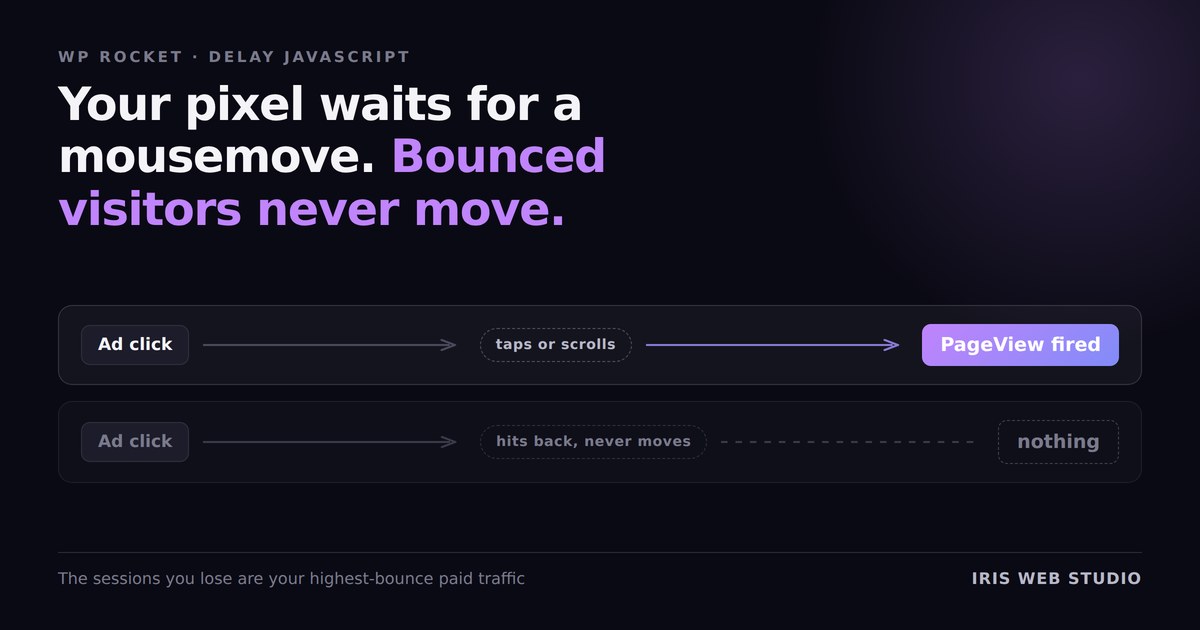
Your ad platform reports a thousand clicks. Your pixel reports six hundred PageViews. Everyone blames ad fraud, or iOS, or cookie consent — and sometimes that is the answer. Sometimes it is a checkbox in your caching plugin.
I found this on a lead-generation site running paid traffic. The Meta Pixel was installed correctly. It was in the page source. It passed the browser extension check. And it was being deliberately held back from firing on a large share of visits, by the plugin that was supposed to be making the site faster.
What Delay JavaScript actually waits for
“Delay JavaScript execution” does not delay a script by a number of seconds. It delays it until the visitor does something. WP Rocket listens for the first of:
That is a sensible trade for a chat widget or a review carousel. Nobody needs those in the first second, and holding them back genuinely improves how fast the page feels.
It is a terrible trade for analytics, because of exactly who it excludes.
It silently deletes your worst traffic from the data
A visitor who lands from an ad, looks at the page, decides it is not for them and hits back — on a phone, without scrolling — has done none of those six things. They never moved a mouse. They never tapped. They never scrolled.
So the pixel never fires. That visit does not exist as far as your ad platform is concerned.
Read that again, because the direction matters: the sessions being dropped are not random. They are specifically your highest-bounce, lowest-engagement paid traffic. The exact segment you are paying for and most need to see. Your reported numbers do not just get smaller — they get flattering, which is worse. Cost per click looks fine. Landing-page engagement looks unusually strong. The campaign looks healthier than it is, and you optimise towards a picture that was edited before you saw it.
The configuration was backwards
WP Rocket has a second setting underneath Delay JS called Safe Mode, on by default, which excludes jQuery and everything that depends on it. On an Elementor site, that is the entire front end — I wrote about what that does to performance in the previous post.
The side effect is the interesting part here. Safe Mode protects the expensive scripts from being delayed, and leaves the cheap ones delayed. On this site that meant:
- The Google Tag Manager loader
- The Meta Pixel init, 469 bytes
- The gtag and dataLayer bootstrap, 432 bytes
Everything that measures. About a kilobyte.
- jQuery and jQuery Migrate
- Seven Elementor bundles
- smartmenus, sticky, lazyload
- An embedded form script
Everything that costs. Hundreds of kilobytes.
A kilobyte of tracking was being throttled to protect a page already loading hundreds of kilobytes of JavaScript without restraint. The setting was doing the opposite of its purpose, and the only visible symptom was a reporting discrepancy that looks like somebody else’s problem.
How to check your own site in two minutes
Open the site in a private window — logged in as admin you will be served
uncached HTML and see none of this. View source and search for
rocketlazyloadscript. Any script with that in place of
type is being held until interaction.
Then look at what is on that list. If you find fbevents.js,
gtm.js, gtag, a dataLayer push, or an
inline block containing fbq( — your measurement is behind the gate.
The fix
Add your tracking to the delay exclusions. In WP Rocket that is File Optimization → Excluded JavaScript Files, and the patterns you want are the tag manager, the pixel, and any inline block that initialises them. They are small. Letting them run immediately costs almost nothing, and it is the entire reason they exist.
Measure after, three runs per device, median — a single PageSpeed run on a real site swings twenty points and will tell you whatever you want to hear.
While you are in there: do not delay anything above the fold
The same site had a second trap that is worth more than the pixel. Its main conversion form — the thing the paid traffic existed to reach — was not a native form at all. It was an iframe, built at runtime by an embedded third-party script, sitting in the hero above the fold.
Delay that script and the form does not exist until the visitor interacts. But on a landing page, the form is the first interaction. You would be asking people to click something that is not there yet.
So before you delay anything, open the page on a phone and look at what is visible without scrolling. Anything that renders that region — a form, a hero slider, a booking widget, a price calculator — is excluded, permanently, no matter what it costs you in score.
One caveat worth keeping
Fixing this will make your PageSpeed score slightly worse, and that is fine. Lighthouse never interacts with a page, so delayed scripts simply never run during the audit — they are invisible to the score and entirely visible to your revenue. A number that improves because measurement was hidden from the measurer is not an improvement.
Optimise the site. Do not optimise the test.