Delay JavaScript Safe Mode does almost nothing on an Elementor site
Someone hands you an Elementor site with a mobile PageSpeed score in the fifties. You open WP Rocket, and Delay JavaScript execution is already ticked. So that is not it, you think, and you go looking somewhere else.
It is it. The setting is on and doing essentially nothing, and the reason is a second checkbox directly underneath it.
I found this on a nonprofit site running paid traffic — a fairly standard WordPress build on SiteGround, Elementor Pro, WP Rocket, an embedded lead form. Mobile performance sat at 57. Every caching setting a checklist would tell you to verify was already correct.
First: you cannot measure this while logged in
Before anything else, this one wastes more hours than any other mistake in WordPress performance work.
WP Rocket has a setting called cache logged-in users, and it is off by default. When it is off, an admin session is served uncached, unoptimized HTML. Not “slightly less optimized” — none of it. No minification, no combined files, no delayed scripts.
On the site above, logged in as admin, view-source showed 70 scripts and
not a single rocketlazyloadscript attribute. It read exactly
like a site where Delay JS had never been switched on. Logged out, the same page
was a different document.
So every measurement has to come from a logged-out session. A private window
works. If you are scripting it, fetch with credentials: 'omit'. Skip
this and you will diagnose a problem that does not exist and miss the one that
does.
The actual finding
Delay JavaScript execution was on. So was Safe Mode for Delay JavaScript, which sits right beneath it and is on by default.
Safe Mode’s job is to protect you from breaking the site. It does that by excluding jQuery and everything that depends on jQuery from being delayed. That is a sensible default on a generic WordPress site.
On an Elementor site it is close to a no-op, because Elementor is built on jQuery. Exclude jQuery and its dependents and you have excluded the entire front end.
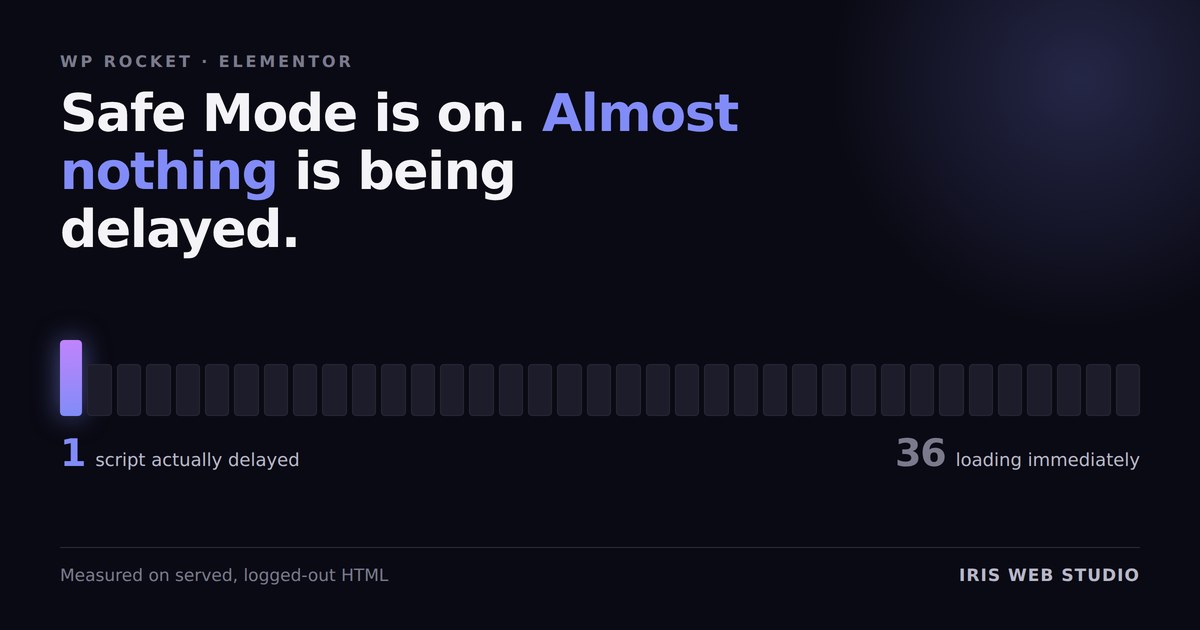
Here is what was actually happening on the served, logged-out HTML:
That is where the blocking time comes from. Not images, not fonts, not the theme. Thirty-six scripts that the setting you ticked was never going to touch.
How to check it on your own site
Open the site in a private window, view source, and search for
rocketlazyloadscript. Every script WP Rocket is delaying carries that
attribute in place of src. Count them. Then count the plain
<script src= tags.
If the first number is small and the second is large, Safe Mode is doing what it did here.
What to do about it, in rising order of risk
- Turn on “Load JavaScript deferred” first. It is a separate WP Rocket setting, frequently left off, and one toggle you can reverse in a second. Try it before anything more invasive.
- Add specific third parties to the delay list by hand. Safe Mode being on does not stop you naming scripts explicitly. Start with whatever is heaviest and least essential to first paint — embedded forms, chat widgets, tag managers. Surgical and low-risk, because you choose exactly what moves.
- Turn Safe Mode off. Biggest win, and the one that will break something. Menus, sliders, accordions, tabs and embedded forms all run on jQuery. If you do this, click every interactive element on every template afterwards. Not a spot check — every one.
There is no fourth option where you get the speed without accepting some risk. Anyone who tells you otherwise is selling a plugin.
Two things that looked like problems and were not
Half of performance work is ruling things out. Both of these came from a checklist written by someone reading the HTML, and both were wrong.
“Images are still serving as PNG.” They were not.
SiteGround’s optimizer rewrites images to WebP at the server level and leaves
the .png extension in the markup. The file extension in your HTML
proves nothing at all. Fetch the bytes and read the content-type
header — the logo and both hero sizes all came back image/webp. The
setting had been on the whole time.
“The homepage title is duplicated.” The English homepage title was clean and always had been. The duplicate was on the Spanish translation, where the title template was rendering an English site name twice on a Spanish page. Real problem, different page — and it would have been missed by anyone who fixed the thing the checklist actually named.
The habit worth taking from both: verify the finding before you fix it, especially when someone else wrote the list.
Take the median of three runs
PageSpeed scores on a real site with unthrottled JavaScript are noisy. On this site, three consecutive mobile runs on an unchanged page returned 83, 60 and 77. Desktop returned 66, 89 and 77.
Run it once and report the number and you are reporting weather, not climate. Run it three times per device and take the middle value. It costs four extra minutes and it stops you chasing a regression that never happened — or worse, billing a client for an improvement that was noise.
What did move
Cache handling and the non-JavaScript fixes took mobile performance from 57 to 77, accessibility from 95 to 100, and SEO from 92 to 100 — all medians of three, measured logged out, with no new plugins installed.
The remaining performance gap is the thirty-six scripts. That is a decision about risk appetite on a live site with paid traffic running, which is the client’s call to make, not mine to make quietly on a Friday afternoon.