Elementor 4.3 ignores flex-shrink: 0
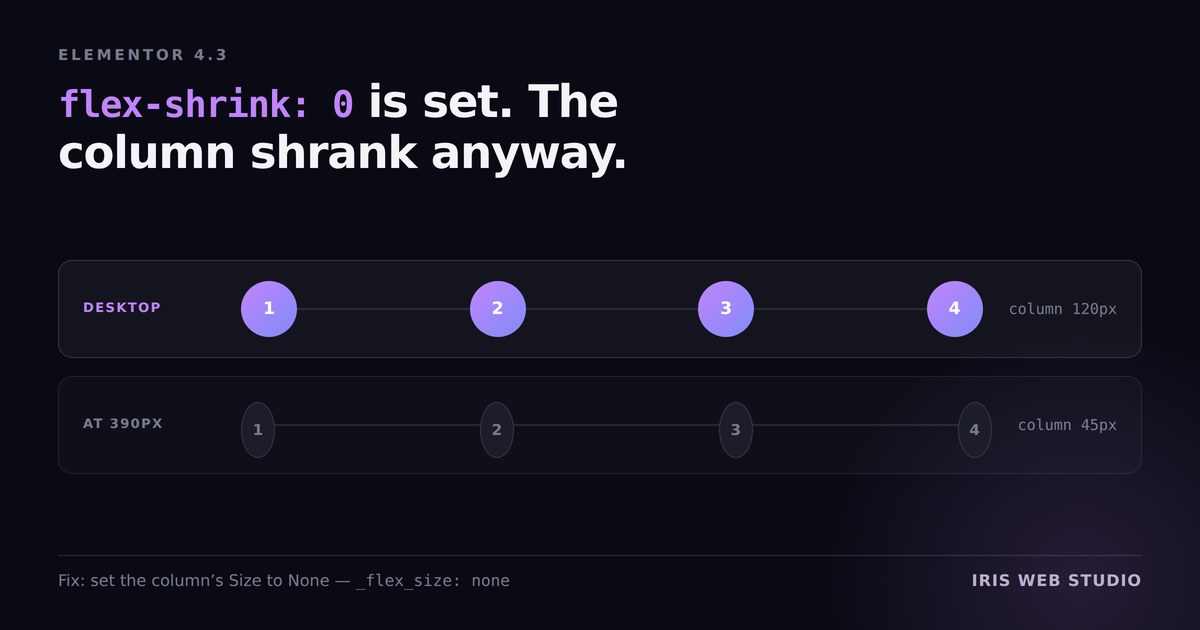
A numbered timeline on a client build looked right on desktop and wrong on a phone. The circles had become ovals, and they were sitting about five pixels off the vertical line they were supposed to be centred on.
The column holding the numbers was set to not shrink. It was shrinking anyway — down to 45px. The setting was there, saved, and being ignored.
Why it happens
In a flex row, every item is allowed to shrink below its natural width when space
runs out. The standard way to opt out is flex-shrink: 0, and the
build had exactly that stored against the column as flex_shrink.
Elementor 4.3 does not apply it. The value is accepted, kept in the JSON, and never reaches the rendered CSS. So at narrow widths the browser does what it always does with a flex item that has no instruction to the contrary: it squeezes it.
And because the circle was sized as a percentage of a column that had quietly become narrower, it stopped being a circle.
The fix
Set the column’s Size to None in the
layout controls. In the saved data that is _flex_size: none, and
unlike flex_shrink it does make it into the output.
Then check it at an actual phone width — 390px is the one I use — because this is invisible at every width where there is enough room, including the one you are probably designing at.
While we are here: the animation that only ran after a click
The same timeline had a second problem that took longer to find. Its reveal animation did nothing on the live site. It worked perfectly in the Elementor editor, and perfectly on a local copy.
On the live site, the script was being held by WP Rocket’s
Delay JavaScript. Delayed scripts have their
type rewritten to rocketlazyloadscript and are not
executed until the visitor interacts — so the animation only started after the
first click or scroll, by which point the visitor had already looked straight at
the thing that was supposed to animate.
The fix is one attribute on the script tag:
WP Rocket skips anything carrying nowprocket. The editor and local
copy never showed the bug because neither of them runs the caching plugin — which
is the whole lesson.
The pattern worth stealing
The animation was built so the steps are visible by default, and only hidden once the script has run and added its own class. Not the other way round.
It sounds like a small detail. It is the difference between a blocked script meaning no animation and a blocked script meaning no content. If the CSS had hidden the steps up front and relied on JavaScript to reveal them, that delay would not have cost a nice effect — it would have shown visitors an empty section until they clicked something.
Same principle applies to the reveal animations on this site, and it is why nothing on a content page should depend on JavaScript to become visible.
The through-line
Both of these are the same failure in different clothes: the setting you saved is not the setting that is applied. One was dropped by the page builder. One was rewritten by the caching plugin. Neither was visible in the tool where the work was done.
Which is why the only check that counts is the rendered page, on the live site, at a real phone width, logged out. Everything before that is a guess — a point I keep arriving at from different directions, most recently in why your Lighthouse score is partly measuring a page nobody receives.